Embedded Checkout
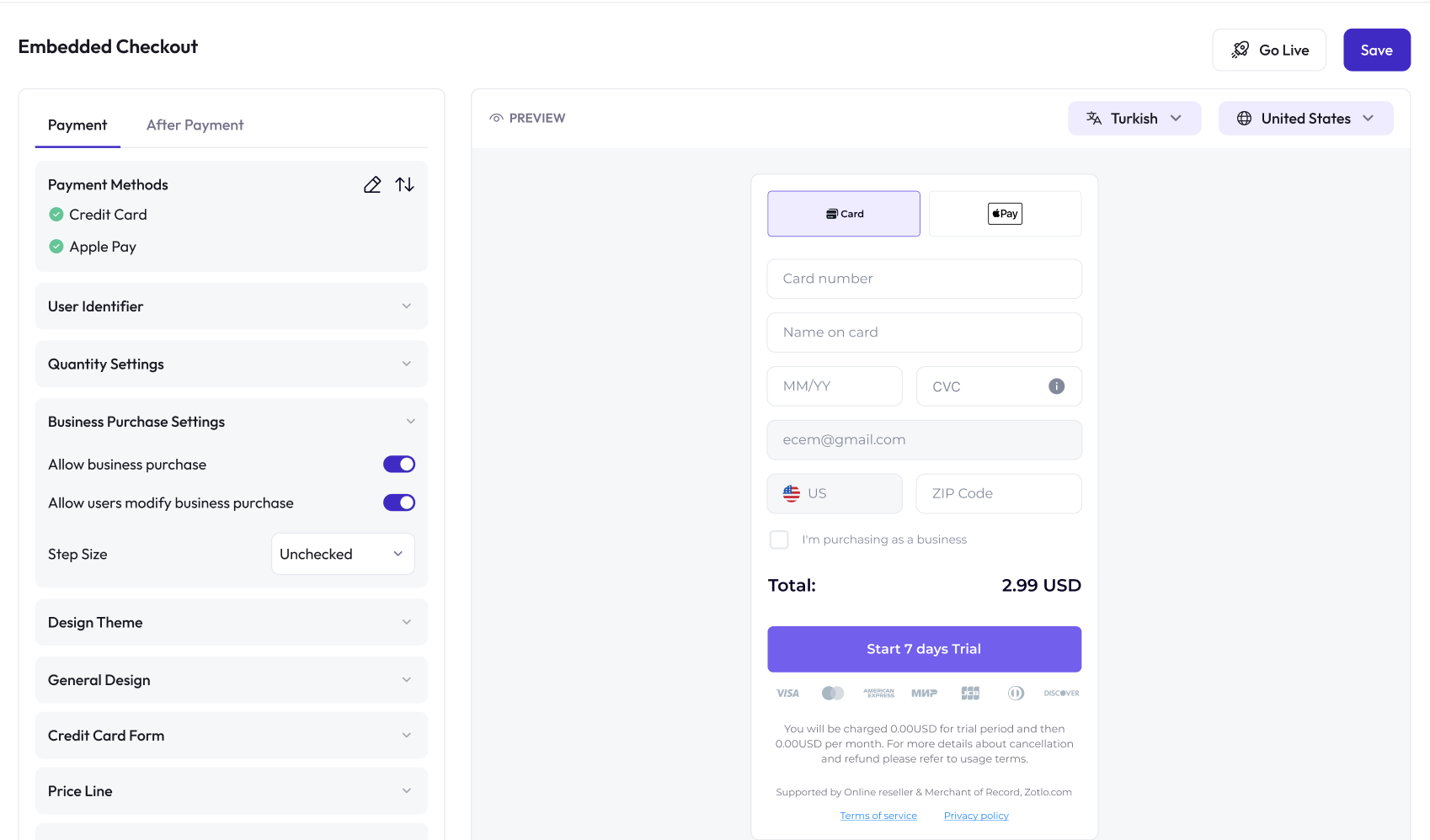
Embedded Checkout allows you to place Zotlo’s secure checkout form directly inside your website or web app. This option provides a seamless, low-code purchase experience while allowing you to control the surrounding UI and user journey.

Embedded Checkout
You embed the checkout form using the Zotlo Checkout SDK, which renders a secure payment form inside your page. The form automatically applies:
Localized pricing
Selected payment methods & custom ordering
Multi-language UI
Branding & theme settings
Quantity selection (where applicable)
Subscription or one-time product configuration
Your customer completes the payment without being redirected to an external page.
Embedded Checkout Form
To create a new embedded checkout:
Go to your project → Embedded Checkout in the Zotlo Dashboard.
Click Get Started and design your checkout form.
Configure your package, payment methods, language, and branding settings.
Use the Checkout SDK snippet to embed the form into your webpage.
Test your setup in Test Mode, then publish to accept live payments.
Checkout forms start in Test Mode. You must publish the form before accepting real payments.
Configurations
Package Settings
Select the product or subscription plan to be sold. Checkout supports :
Subscriptions
One-time purchases
Trials
Discounts
Country-based pricing rules
Learn more about product creation and pricing.
Payment Settings
Choose which payment methods to display. After activating methods in your project:
Add them to the checkout form
Arrange display order as you prefer
Ensure Apple Pay / Google Pay domains are verified
External PSP-linked methods appear only if supported by your PSP
Learn more about payment methods and how to activate them
User Identification
Choose whether the user should enter their email or phone number during checkout.
If your app already knows the user, you can provide this information by passing a subscriberId while initiating the embedded checkout. When a valid identifier is provided, the user does not need to enter email/phone again in the checkout form.
When a subscriberId is passed, you can control how it behaves inside the checkout:
Auto-hide Email/Phone: hide the field when the identifier is already provided
Allow Edit: allow users to update the identifier if needed
UUID Support: you may pass a UUID, but email/phone will still be required for subscriptions
If you prefer you can pass a unique identifier (UUID) but remember if you are passing UUID as user identifier email/phone entry still be required for subscriptions.
Branding & Layout
Choose from different layout themes and customize:
Theme selection
Logo & header
Colors, fonts, label visibility
Price layout (subtotal, total, discount visualization)
CTA button styles (except Apple Pay, Google Pay, PayPal — brand rules apply)
Optional product imagery
Quantity settings
Business purchase (tax ID) fields
Redirects After Payment
After a successful payment, Zotlo can redirect users back to your app or to any web page, depending on your setup.
Zotlo supports two types of post-payment journeys:
1. App-to-Web Theme
(When checkout is opened from a mobile app)
Use this flow when your app triggers the checkout.
The app opens the checkout in an external browser or in-app WebView.
After purchase, Zotlo redirects the user back into your app via a deeplink.
If you're using a WebView, the developer must close the WebView manually after redirection.
App-to-web is ideal for apps that offload purchases to the web and need to return users smoothly to in-app content.
2. Web-to-App Theme
(When checkout is opened from the web)
This flow is used when the purchase journey begins on the web. After the payment is completed, Zotlo can:
a) Redirect to your mobile app (Web → App)
By showing deeplink buttons
Or App Store / Google Play download buttons
Configured via dashboard (store URLs + deeplink)
Web-to-app is ideal for marketing funnels that start on the web but should continue inside the app.
b) Redirect to any web page (Web → Web)
Using your own success URL
Or a generic redirect link
Fully customizable
Ideal for standard web-based businesses (no mobile app needed).
Publishing Checkout
Embedded checkout forms start in Test Mode and must be published before you can accept real payments.
When you publish, Zotlo performs an automatic review to ensure the form is ready for live use. If everything is complete, the form goes live instantly.
After publishing, your embedded checkout becomes immediately available for real users.
Checkout Analytics
After publishing, a Statistics tab becomes available. You can track:
Traffic
Conversions
Revenue
Country, device, and package insights
These metrics help optimize your checkout experience and improve performance.
Embedded Checkout Integration Guide
Step-by-step guide to integrating embedded checkout with sample codes
Hosted Checkout (No-code)
Learn more about the fully hosted checkout option that you can launch instantly.
Last updated

